
CFP® Experience Reporting
1. Login to your CFP Board Profile at CFP.net. This will take you to the Welcome page. If you do not have an account, click My Account on the top right-hand side of the screen, then click on Create One Now.

2. Under My Account, scroll down to the Certification Tracker graphic toolbar, and click on the Experience tab to take you to the Experience page.

3. Scroll down, and on the left-hand side of the screen, click on Report or View Your Experience.

4. This will take you to the Experience Reporting Profile, and on the bottom right-hand side, click Add Experience.

5. This page will prompt you to select your experience type – please select the highlighted for the MTP program. Once you have made your above selection, click Continue on the bottom right-hand side.

6. Under Experience Details, enter the required information, highlighted below.
For Company Name, enter "Measure Twice Planners."
For the Start Date, enter the first day of the month in which you completed the MTP Experience quiz. (Example: October 1, 2026)
For the End Date, enter the second day of the month in which you completed the MTP Experience Quiz (Example, October 2, 2026).
IMPORTANT NOTE: If you complete more than one Experience Quiz in the same month, you must report each Quiz to CFP Board separately, and without overlapping dates. Following the previous example, the next Quiz would be reported with a Start Date of October 3, 2026, and an End Date of October 4, 2026 to avoid overlapping dates.
For Position, enter "Participant."
Under Primary Job Activity, from the drop-down menu, please select Financial Planning Research.

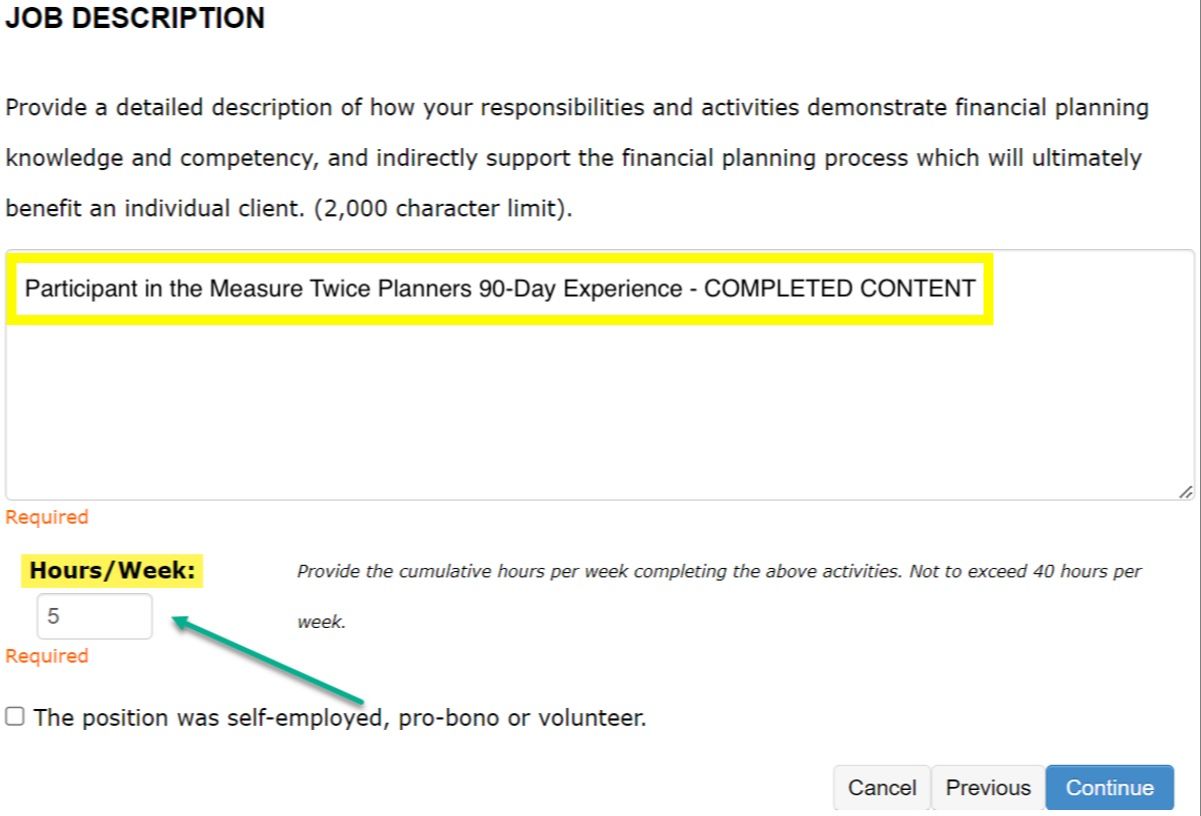
7. Below the Primary Job Activity is the Job Description.
Please enter the following: "Participant in the Measure Twice Planners 90-Day Experience -" followed by the content you completed.
For example: "Participant in the Measure Twice Planners 90-Day Experience - Video Course," "Participant in the Measure Twice Planners 90-Day Experience - Jamie's Case Study," or "Participant in the Measure Twice Planners 90-Day Experience - October 2026 Content."
For Hours/Week, enter "5" then click Continue. If you receive an error message, enter "0" instead. The CFP Board will manually update the hours to the correct amount (50, 150, etc.).
8. This will take you to the Experience Attestation page. Please enter the below required highlighted fields, and then click Save.
Supervisor Name is "Cody Garrett."
Supervisor Email Address is "[email protected]."

If you have any questions about CFP® Experience reporting in general, please email [email protected].